WebPart s Copilot AI – HTML
07.07.2026
Implementacija WebPart komponente z orodjem Copilot AI omogoča napredno dinamično generiranje HTML uporabniškega vmesnika in inline CSS stilov. Za zagotavljanje popolne interaktivnosti sistem uporablja ročno dodane poslušalce dogodkov (EventListener), ki se vežejo na unikatne ID atribute generiranih elementov. Ta pristop omogoča hitro prilagajanje vizualnega videza, takojšnje spremembe tem ter vključevanje SVG animacij neposredno preko tekstovnih pozivov, brez vpliva na preostalo strukturo kode.
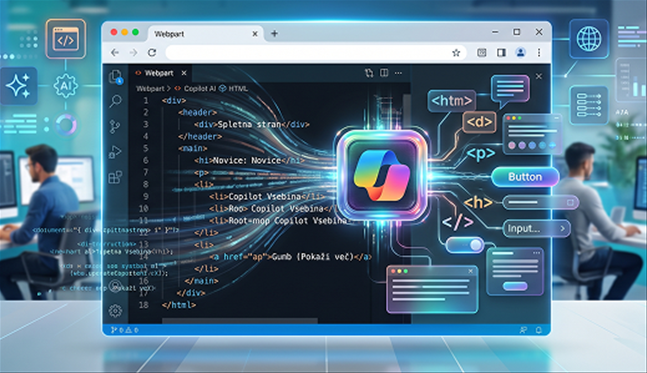
Implementacija WebPart komponente, ki uporablja Copilot AI za dinamično generiranje UI ( uporabniškega vmesnika ) v obliki HTML kode ter uporabniškimi interakcijami.
Copilot AI se uporablja kot generator HTML uporabniškega vmesnika. Da zagotovimo konsistentne in pravilne rezultate, se mu določi:
- vloga (persona): npr. "You are a strict HTML UI generator"
- omejitve odziva: dovoljen je izključno HTML
- dodatna navodila: kaj mora ali ne sme biti vključeno v odgovor
- poziv uporabnika
Za izboljšanje natančnosti generiranja se Copilot AI posreduje tudi primer obstoječe HTML strukture trenutnega pogleda.
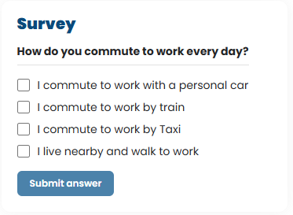
Primer izgleda WebParta:
Copilot AI mora generirati HTML, ki ustreza naslednjim zahtevam:
- vsi interaktivni elementi morajo vsebovati unikatne id atribute za kasnejšo manipulacijo DOM elementov (title, label, input, button)
- vsi vizualni stili morajo biti definirani kot inline CSS zaradi neodvisnosti od zunanjih stilov in enostavnejše dinamične manipulacije
Generiran HTML se v WebPartu prikaže z uporabo React lastnosti »dangerouslySetInnerHTML« ( this.state.reply je odziv Copilo AI ) in se uporabi v render metodi:
<div dangerouslySetInnerHTML={{ __html: this.state.reply }}></div>
Za interaktivnost je potrebno ročno dodati poslušalce dogodkov ( EventListener ), saj je HTML generiran dinamično.
Poslušalec dogodkov ob dogodku »click« sproži metodo »eventClick«, katera preveri, če je izbrani element, ki je bil kliknjen, »button« z ID »btnConfirm«.
private eventClick = (event: Event): void => {
const target = event.target as HTMLElement;
if (target.id == "btnConfirm") {
this.addItem().then().catch((err) => { console.error(err) });
}
}
Ker lahko Copilot AI generira poljubno število odgovorov:
- uporabimo »querySelectorAll« za izbor vseh elementov z ID »surveyInput«
- se sprehodimo skozi elemente
- shranimo izbrane vrednosti
private recordAllOptions(): void {
const options = document.querySelectorAll<HTMLInputElement>('input[id^="surveyInput"]');
options.forEach((option) => {
const check = option.checked
const parent = option.parentElement;
const span = parent?.querySelector("span");
if (span) {
const name = span?.textContent as string;
const value = check;
this.setState(prev => ({ checkboxState: { ...prev.checkboxState, [name]: value } }));
}
})
}
Spremeni se lahko tudi posamezne elemente:
- »button« sprememba besedila ali menjanje metode ob kliku
- »label« sprememba besedila ali status prikaza
private changeBtnAndLbl(): void {
const label = document.getElementById("lblConfirm");
const button = document.getElementById("btnConfirm");
if (label && button) {
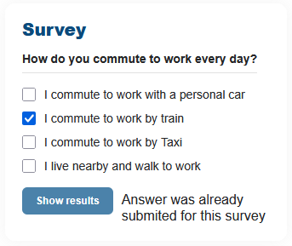
label.textContent = "Answer was already submited for this survey";
button.textContent = "Show results";
}
}
Primer izgleda izpolnjenega WebParta:
Dinamično spreminjane stilov za prilagajanje videza brez ponovnega generiranja celotnega HTML:
- uporaba »querySelectorAll« in »getElementById«
- sprememba stilov prek »element.style.<property>
S tem pristopom ohranimo obstoječo strukturo in spreminjamo le potrebne vizualne lastnosti.
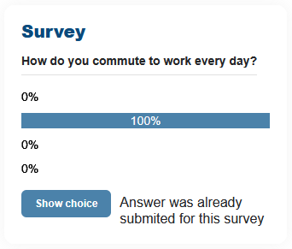
Po obdelavi se UI prilagodi za prikaz rezultatov:
- sprememba stilov ( barve, ozadje, širina … )
- prikaz podatkov
private changeViewElements(valueArray: number[], totalNumber: number): void {
const checkbox = document.querySelectorAll<HTMLInputElement>('input[id^="surveyInput"]');
let counter = 0;
const button = document.getElementById("btnConfirm");
if (button) {
const color = button.style.color;
const backgroundColor = button.style.backgroundColor;
checkbox.forEach((option) => {
const parent = option.parentElement;
const span = parent?.querySelector("span");
if (option) {
option.style.display = "none";
}
if (parent) {
parent.style.width = "100%";
}
if (span) {
const calcRatio = (valueArray[counter] / totalNumber) * 100;
const ratio = Math.round(calcRatio);
if (ratio != 0) {
span.style.textAlign = "center";
span.style.color = `${color}`;
span.style.backgroundColor = `${backgroundColor}`;
span.style.width = `${ratio}%`;
span.textContent = `${ratio}%`;
} else {
span.style.textAlign = "center";
span.style.color = `${color}`;
span.style.backgroundColor = `${backgroundColor}`;
span.style.width = `${ratio}%`;
span.textContent = `${ratio}%`;
span.style.filter = "invert(100%)";
}
counter++;
}
})
}
}
Primer izgleda WebParta prikaz rezultatov:
Prilagoditev WebParta z uporabo pozivov, kjer Copilot AI omogoča tudi vizualne in vsebinske prilagoditve:
- menjava teme: Halloween
- zahtevana vsaj 1 animacija
- sprememba besedila glede na temo
Rezultat:
- prilagoditev besedila temi
- dodan SVG za animacijo ozadja
- posodobljeni stili temi

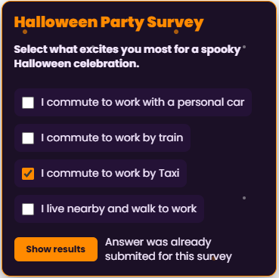
<div style="background-color:#1B1026;color:#F5E9FF;font-family:Poppins,Arial,sans-serif;border-radius:12px;display:flex;flex-direction:column;align-items:flex-start;gap:16px;padding:16px;border:1px solid #FF8A00;box-shadow:0 8px 24px rgba(0,0,0,0.4);background-image:url("data:image/svg+xml;utf8,%3Csvg%20xmlns='http://www.w3.org/2000/svg'%20width='200'%20height='200'%3E%3Crect%20width='200'%20height='200'%20fill='none'/%3E%3Ccircle%20cx='30'%20cy='40'%20r='3'%20fill='%23FF8A00'%20opacity='0.4'%3E%3Canimate%20attributeName='opacity'%20values='0.2;0.8;0.2'%20dur='2.5s'%20repeatCount='indefinite'/%3E%3C/circle%3E%3Ccircle%20cx='120'%20cy='60'%20r='2'%20fill='%23FFFFFF'%20opacity='0.3'%3E%3Canimate%20attributeName='opacity'%20values='0.1;0.6;0.1'%20dur='3.2s'%20repeatCount='indefinite'/%3E%3C/circle%3E%3Ccircle%20cx='80'%20cy='140'%20r='3'%20fill='%23FF8A00'%20opacity='0.35'%3E%3Canimate%20attributeName='opacity'%20values='0.15;0.75;0.15'%20dur='2.8s'%20repeatCount='indefinite'/%3E%3C/circle%3E%3C/svg%3E");background-repeat:repeat;">
<h2 id="surveyTitle" style="color:#FF8A00;font-size:20px;font-weight:900;line-height:22px;margin:0;transition:color 0.3s ease;">Halloween Party Survey</h2>
<div style="width:100%;">
<h3 style="color:#F5E9FF;font-size:14px;font-weight:700;line-height:19px;margin:0 0 7px 0;">Select what excites you most for a spooky Halloween celebration.</h3>
<div style="border-bottom:1px solid:#FF8A00;width:100%;margin:6px 0 0 0;"></div>
</div>
<div style="width:100%;display:flex;flex-direction:column;gap:10px;">
<label style="display:flex;align-items:center;gap:10px;cursor:pointer;padding:8px 10px;border-radius:8px;background-color:#241236;transition:background-color 0.3s ease;">
<input id="surveyInput" type="checkbox" style="width:16px;height:16px;margin:0;cursor:pointer;accent-color:#FF8A00;" />
<span style="font-size:14px;line-height:18px;color:#F5E9FF;">Costume contest</span>
</label>
<label style="display:flex;align-items:center;gap:10px;cursor:pointer;padding:8px 10px;border-radius:8px;background-color:#241236;transition:background-color 0.3s ease;">
<input id="surveyInput" type="checkbox" style="width:16px;height:16px;margin:0;cursor:pointer;accent-color:#FF8A00;" />
<span style="font-size:14px;line-height:18px;color:#F5E9FF;">Pumpkin carving</span>
</label>
<label style="display:flex;align-items:center;gap:10px;cursor:pointer;padding:8px 10px;border-radius:8px;background-color:#241236;transition:background-color 0.3s ease;">
<input id="surveyInput" type="checkbox" style="width:16px;height:16px;margin:0;cursor:pointer;accent-color:#FF8A00;" />
<span style="font-size:14px;line-height:18px;color:#F5E9FF;">Haunted games</span>
</label>
<label style="display:flex;align-items:center;gap:10px;cursor:pointer;padding:8px 10px;border-radius:8px;background-color:#241236;transition:background-color 0.3s ease;">
<input id="surveyInput" type="checkbox" style="width:16px;height:16px;margin:0;cursor:pointer;accent-color:#FF8A00;" />
<span style="font-size:14px;line-height:18px;color:#F5E9FF;">Spooky snacks</span>
</label>
</div>
<div style="display:flex;gap:10px;align-items:center;">
<button id="btnConfirm" type="button" style="white-space:nowrap;width:fit-content;background-color:#FF8A00; color:#1B1026;border:none;border-radius:6px;padding:8px 16px;margin:0px;cursor:pointer;height:32px;font-family:Poppins,Arial,sans-serif;font-size:12px;font-weight:700;line-height:16px;transition:transform 0.2s ease;">Submit vote</button>
<label id="lblConfirm" style="background-color:transparent;color:#F5E9FF;font-size:14px;font-weight:400;line-height:19px;"></label>
</div>
</div>

Imate dodatna vprašanja?
Za več informacij smo vam vedno z veseljem na voljo. Pišite nam na info@kompas-xnet.si ali nas pokličite 01 5136 990.
Kontaktirajte nasNovice
Naročite se na Xnet novice in ostanite na tekočem glede novih tečajev, seminarjev, možnosti pridobitve novih certificiranj in akcijskih cen.
Podelite z ostalimi
Deli preko socialnih omrežij:


